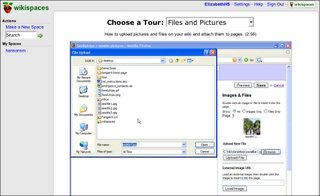
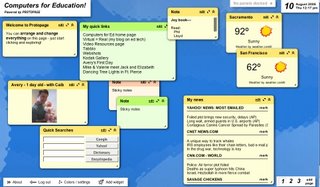
A sample of lessons at Learn Free:

One downside may be that the visual instructions are great, but are accompanied by rather high level aural instructions--if learners could understand them, they might not need the training.


* Make and store up to 15 minutes of recordings
* Enjoy FREE unlimited listening
* Record on the fly from your phone
* Use our in-browser recorder and your computer mic
* Record Skype calls
* Do instant Podcasting using RSS
* Record conference calls, interviews, team meetings and oral history
* Post recordings to your blog and website
* Email online recordings to your colleagues and friends
* Order transcriptions and translations right online


*Blogs* - Blogs are ongoing individual postings with the ability to take
comments from readers. This is a great way to journal, reflect or get
input.
*WIKIs* - are online editable pages available to anyone given
permission. Usually you can attach files to wiki pages and there is a
comment page connected. This is good for collaboration. It does not
fit the journal model as well as it does a portfolio / archive model.
Of course, it is also great for multiple editors of a single document.
*Forums* - threaded discussions. Can be used for the same as above.
They individualize each posting, but in a threaded manner unlike blogs
which are sequential
*Social networks* - combine all or some of the above with many added
features. If you are ready to launch your students into the cybersphere
of learning, this is the way to go. I like Ning - but it still does not
have a wiki module although the blog and forums are great.
*Course Management Systems* - also combines the above features and adds
the ability to quiz etc. It is an online class. My favorite is Moodle
(at the moment). Students are part of a class and can use the forums,
wikis, as well as complete assignments. I do not like the blogging
feature presently being used.
There are hybrids of all the above - and more appear each day. The key
is to know what your goals are for each project.
- Is it your students first adventure into online learning?
- Do you simply want journals?
- Do you wish to attach artifacts?
- Do you want to actually hold your class online with assessment and all?
- Do you want to use these [features] in a more social atmosphere?
- Do you have the ability to pay for a service or to host it "in house"?


supporting argumentative collaboration and decision making for Communities of Practice.Other tools mentioned were Gliffy (discussed elsewhere in this blog and something I've used quite a bit for very professional-looking diagrams), Thinkature (real-time collaboration on the Web, allowing the use of your own photos and drawings), and the software, MindManager (for both Mac and Win/DOS), which is not simultaneously collaborative, as I understand it.
Start skrbl & give out your URL; instantly share online. Collaborate with others or, keep skrbl your own private web space.Bubbl.us looks very cool as a collaborative tool and suggests it might be useful for brainstorming. Love the concept, but like much of Java-based stuff, it tends to be a bit slithery. It will take a little getting used to to use the "bubbles" with facility.
Mindomo is a versatile Web-based mind mapping tool, delivering the capabilities of desktop mind mapping software in a Web browser - with no complex software to install or maintain.So all of these share some features and would involve a bit of trial-and-error to decide which worked best for your students.
Create, edit mind maps, and share them with your colleagues or your friends.


enables anyone to create streaming media 'channels' that combine video, music, photos, narration, text and RSS feeds. These user-generated channels can be played and easily syndicated on any web site, blog, or social network page.
When channel owners modify their channel, their content is automatically updated across all the web pages 'tuned' to that channel.


Having students make flash cards in the classroom out of pen and paper is always a good learning experience — both in their creation and in their use.
Now there are countless sites on the web that allow students to make and use them online. As in quite a few of the activities on my site, I don’t necessarily see any major advantage to doing it online as opposed to doing it “old school.” It’s just a nice change of pace sometimes.
I’ve found five sites that are free and easy enough for English Language Learners of all levels to use. Students can create the permanent flash cards online and then they, or any other student, can access them.
You’ll find these five sites under the Student Flash Cards category on my Examples of Student Work. [This page has some great student work!--E.]
Four sites that have been on my site for awhile are
Flashcard Machine [requires registration and login]
Flashcard Exchange [printable, several languages, many ready-made to share]
Study Cards Online [create, study, share]
Study Stack [once logged in, you can add data to others' stacks]
I think they all function well, and it’s hard to say any one is better than the other. I just learned about the fifth one, Memorizable, and haven’t had the opportunity to check it out fully yet.


The Freesound Project aims to create a huge collaborative database of audio snippets, samples, recordings, bleeps, ... released under the Creative Commons Sampling Plus License. The Freesound Project provides new and interesting ways of accessing these samples, allowing users to
* browse the sounds in new ways using keywords, a "sounds-like" type of browsing and more
* up and download sounds to and from the database, under the same creative commons license
* interact with fellow sound-artists!
We also aim to create an open database of sounds that can also be used for scientific research. Many audio research institutions have trouble finding correctly licensed audio to test their algorithms. Many have voiced this problem, but so far there hasn't been a solution.
How can you help?
If you have audio samples which can be released under the Creative Commons Sampling Plus License please add them! Label them correctly and help us build a huge database.
Note we are not looking for songs, or compositions. We are looking for sounds. Field recordings, kit recordings, generated sounds, ... as long as the sounds are not copyrighted (in a non-compatible way) or if the sounds are made by yourself and you want to release them under the Creative Commons Sampling Plus License.


The languages faculty at Duke University in Durham, North Carolina has been experimenting with the use of iPods to enhance teaching and learning since 2004 as part of The Duke Digital Initiative. . . .
The mobility of listening comprehension activities and recording capabilities has opened up new avenues for language students and instructors.
The iPods are used by the students and professors in the following ways:
The students:
* listen to audio clips based on their workbook and textbook as well as dramatic recordings of four short 'novellas'
* read text files which accompany the audio material to further improve their comprehension
* record dialogues and keep a weekly 'oral diary' using an attached microphone
* explore the use of Spanish language podcasts
* interview native speakers
The professors:
* record feedback on compositions and oral exams
* create an iTunes playlist including Spanish language songs used to reinforce grammar, functions and vocabulary in class
* make weekly recordings called 'audio flashcards' which are designed to revise vocabulary and review pronunciation
* monitor students' progress in speaking Spanish
* record native Spanish speakers of different backgrounds reading the course literature
Absolutely Intercultural is the first podcast in the world to deal with intercultural issues. We’ll be releasing a new episode every second Friday evening, looking at all intercultural aspects of human intercultural communication.